







Contents
Life and work often force us into sedentary routines, where poor posture becomes an unconscious habit. However, slumping is more than just a bad habit-it is a silent health destroyer.
The consequences extend far beyond a “lazy” appearance. Prolonged incorrect posture distorts your gait and dramatically increases the risk of spinal degeneration, permanent kyphosis (hunchback), and circulatory issues like varicose veins. Correcting your posture and scheduling regular bone and joint checkups are not just about boosting confidence-they are essential steps to protect your long-term health.
1. Why is Correct Sitting Posture Important?
Correct sitting posture is defined as the state where the body’s main structures are aligned in a “neutral” position. In this state, the least amount of strain is placed on supporting muscles and ligaments, maintaining the spine’s natural curves with appropriate muscle tension.
1.1. The 9 Major Health Benefits
Maintaining proper alignment is not just about aesthetics; it is a fundamental component of preventative health:
- Preserves Spinal Structure: It prevents the spine from becoming fixed in abnormal positions, reducing the risk of permanent deformities (such as Kyphosis or Scoliosis progression).
- Prevents Joint Degeneration: By keeping bones and joints in correct alignment, posture reduces abnormal wear and tear on joint surfaces. This is critical in preventing the onset of Osteoarthritis (degenerative arthritis).
- Alleviates Pain & Tension: Proper alignment significantly reduces stress on the spinal ligaments and muscles, minimizing back pain, neck tension, and the risk of overuse injuries.
- Boosts Energy & Concentration: When the body is aligned, muscles function more efficiently, using less energy to hold the body upright. This reduction in physical fatigue reserves more energy for the brain, enhancing focus and productivity.
- Improves Breathing & Oxygenation: Slouching compresses the diaphragm. Correct posture opens the chest cavity, allowing the lungs to expand fully. This increases oxygen intake to the brain and body, promoting mental clarity and vitality.
- Enhances Circulation: Good posture facilitates optimal blood flow, preventing issues like varicose veins and ensuring nutrients are efficiently delivered to tissues.

1.2. The High Cost of Poor Ergonomics
The shift towards remote work and digital lifestyles has led to a significant increase in sedentary behavior. Without conscious adjustment, frequent contact with electronic devices often leads to “slouching” or “tech neck.”
- The Consequences: Sitting incorrectly or for prolonged periods does more than cause temporary stiffness; it fundamentally alters the body’s structure:
- Musculoskeletal Damage: It significantly increases the risk of disc herniation, spinal degeneration, and muscle spasms. Over time, it can lead to permanent deformities such as Kyphosis (Hunchback) or aggravatе existing Scoliosis.
- Systemic Health Issues: Severe spinal curvature reduces the volume of the chest cavity, compressing internal organs like the heart and lungs. This leads to shortness of breath, reduced oxygenation, and overall health deterioration.
- Aesthetic Impact: Poor posture negatively affects gait and physical appearance, projecting a lack of energy or confidence.
>> Related post: Disc syndrome and information you should not pass
2. The Ultimate Guide to Ergonomic Sitting
Correct sitting posture varies slightly depending on height and chair type, but the biological goal remains the same: Neutral Alignment. Follow this “Head-to-Toe” checklist to protect your spine.
2.1. The “Neutral Spine” Setup (Step-by-Step)
2.1.1. Back & Hips ( The Foundation)
- Sit Deep: Push your hips as far back into the chair as they will go. Your buttocks should touch the backrest.
- Support the Curve: Maintain the natural lumbar curve. If your chair lacks lumbar support, use a small cushion or rolled towel behind your lower back.
- Even Weight: Ensure your body weight is distributed evenly across both hips. Do not cross your legs, as this tilts the pelvis and twists the spine.
2.1.2. Shoulders & Head (The Upper Body)
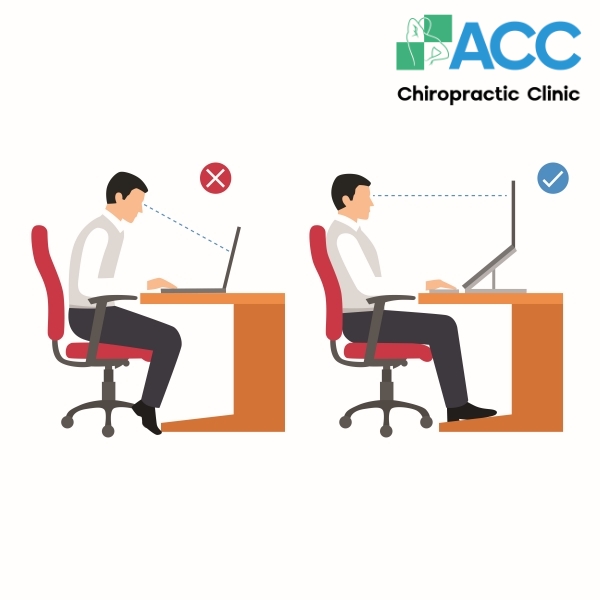
- Look Forward: Position your screen so the top third of the monitor is at eye level. This prevents you from tilting your neck down (“Text Neck”).
- Relax the Shoulders: Keep shoulders relaxed and down, not hunched up near your ears.
- Tuck the Chin: Keep your ears aligned with your shoulders. Avoid jutting your chin forward.
2.1.3. Arms & Elbows
- The “L” Shape: Keep your elbows close to your body, bent at an angle between 90 and 100 degrees.
- Floating Wrists: Forearms should be parallel to the floor. Your hands should float above the keyboard with wrists straight, not bent up or down.
2.1.4. Legs & Feet
- The 90-Degree Rule: Your knees should be bent at a 90-degree angle, with your knees level with or slightly lower than your hips.
- Gap Check: There should be a small gap (about 2-3 fingers wide) between the back of your knees and the edge of the seat to prevent circulation cutoff.
- Grounded: Feet must be flat on the floor. If they don’t reach, use a footrest.
2.2. Movement Rules
- The Swivel Technique: When using a swivel chair, never twist just your lower back to reach for something. Instead, use your feet to rotate your entire body and the chair together.
- The “Reset” Rule: Sitting is inherently static. To prevent blood vessel blockage and pelvic nerve pain, you must stand, walk, or stretch for 1-2 minutes every hour.

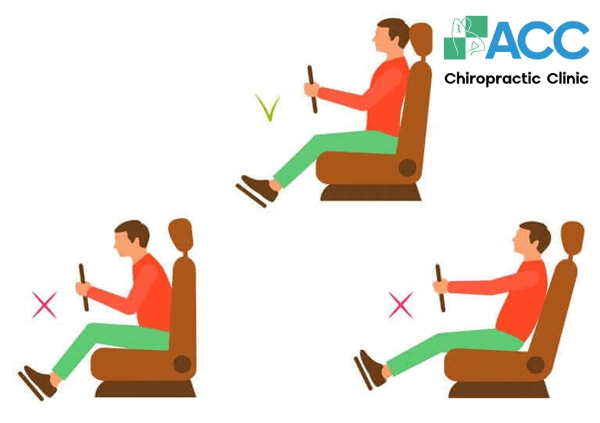
2.3. Ergonomics for Drivers (Correct Driving Posture)
For professional drivers or those who commute long distances, the combination of static posture and vehicle vibration places immense stress on the spine. To prevent chronic back pain and “Driver’s Hunch,” follow this setup routine:
2.3.1. Hips and Seat Position
- Sit Deep: Push your hips all the way back against the seat. There should be no gap between your pelvis and the backrest.
- Lumbar Support: This is crucial. Adjust the seat’s lumbar support so it gently fills the curve of your lower back. If your car lacks this, use a small rolled towel or a specialized lumbar cushion.
- Knee Angle: Your knees should be level with or slightly higher than your hips. This bucket-seat position helps take pressure off the hamstrings and lower back.
>> Read more about: Common causes of knee pain
2.3.2. Distance from Pedals
The “Slight Bend” Rule: Move the seat forward enough so that you can depress the pedals fully without your back coming off the seat. Your knees should remain slightly bent (about 120 degrees) even when the pedal is floored. Avoid fully extending your legs, as this locks the hips and increases strain.
2.3.3. Steering Wheel Reach
- Arm Position: Adjust the steering wheel (reach and tilt) so that when you hold it, your elbows are slightly bent and relaxed. You should not have to reach forward or lift your shoulders.
- Safety Gap: Keep a distance of at least 25-30 cm (10-12 inches) between your chest and the steering wheel to allow the airbag to deploy safely.
2.3.4. The Headrest (Whiplash Protection)
The headrest is not for sleeping; it is a safety device. Adjust the height so the middle of the headrest aligns with the middle of your head (top of your ears). It should be close to the back of your head (touching or almost touching) to prevent whiplash in an accident.
2.3.5. Active “Micro-Breaks”
If driving for long periods, shift your weight occasionally. Whenever you stop for gas or a break, get out of the car and stretch your hamstrings and hip flexors to reset your spine.
- Monitor Height: The original text suggested placing the screen “5 cm higher” than eye level. This causes neck extension (looking up), which is harmful. The standard is for the top of the screen to be at eye level so the gaze is slightly downward.
- Knee Contact: The original suggested thighs should be “in contact with the edge of the chair.” This cuts off circulation. I corrected this to ensure there is a gap behind the knee.
3. The Ideal Computer Workstation Setup
For those who spend hours at a desk, achieving the perfect ergonomic setup is the best defense against spinal degeneration. Follow this “Top-Down” checklist to align your workspace with your body mechanics.
Step 1: Head & Neck (The Visual Line)
- Alignment: Keep your ears aligned directly over your shoulders. Avoid jutting your chin forward (“turtle neck”).
- Screen Position: This is critical. The top of your monitor should be at or slightly below eye level. You should look slightly downward at the center of the screen, not up.
- Distance: The monitor should be approximately one arm’s length away (about 50–70 cm) from your face.
Step 2: Shoulders & Arms (The “L” Shape)
- Relaxation: Shoulders should be relaxed and down, not hunched up toward your ears.
- Elbow Angle: Keep your elbows close to your body, bent at a 90–100 degree angle (forming an “L” shape).
- Wrists: Your forearms should be parallel to the floor. Keep wrists straight and “floating” above the keyboard-do not rest them on the edge of the desk while typing, as this compresses the carpal tunnel.
Step 3: Back Support
- Lumbar Curve: Sit all the way back so your buttocks touch the backrest. Use the chair’s lumbar support (or a cushion) to maintain the natural inward curve of your lower back. Never slump or leave a gap behind your lower spine.
Step 4: Legs & Circulation
- The 90-Degree Rule: Your hips and knees should be bent at roughly a 90-degree angle.
- The “Gap” Rule: Ensure there is a small gap (about 2–3 fingers wide) between the back of your knees and the edge of the seat. Do not let the chair edge dig into your calves, as this restricts blood flow.
- Grounded: Feet must be flat on the floor. If they dangle, use a footrest.
4. Common Posture Mistakes to Avoid
To protect your spine, you must not only adopt the right habits but also actively eliminate the “posture killers” that destroy your alignment. Avoid these common errors:
4.1. “Tech Neck” (Forward Head Posture)
- The Mistake: Jutting the chin forward or tilting the head back to look at a screen.
- The Risk: For every inch your head moves forward, the weight on your neck increases by 10 lbs. This leads to rapid cervical spine degeneration and chronic headaches.
4.2. “Sacral Sitting” (The Slouch)
- The Mistake: Sliding your hips forward so your buttocks are on the edge of the chair and your upper back leans against the backrest.
- The Risk: This removes the natural curve of the lower back, placing the entire weight of the upper body directly on the lumbar discs, increasing the risk of herniation.
4.3. Crossed Legs or Ankles
- The Mistake: Habitually crossing knees or ankles while sitting.
- The Risk: This tilts the pelvis and forces the spine to curve sideways to compensate. Over time, this causes pelvic misalignment, uneven hip wear, and circulation issues (varicose veins).
4.4. The “Phone Hunch”
- The Mistake: Dropping the head low to look at a phone or documents on the desk.
- The Risk: This reverses the natural curve of the neck (loss of lordosis), straining the posterior neck muscles and leading to Cervical Spondylosis.
4.5. Leaning & Dangling
- Leaning: Constantly leaning to one side (e.g., onto an armrest) causes muscular imbalances and functional scoliosis.
- Dangling Feet: Sitting in a chair that is too high prevents the legs from supporting the body’s weight, cutting off circulation under the thighs and straining the lower back.
4.6. The “Statue” (Immobility)
- The Mistake: Sitting in the “perfect” position for hours without moving.
- The Risk: Even the best posture becomes harmful if held too long. Lack of movement causes muscle stiffness and reduces blood flow to the discs. You must move to lubricate the joints.
5. Proactive Tips for a Healthy Spine
Beyond just sitting correctly, incorporating these ergonomic habits into your daily life will reinforce your posture and prevent spinal degeneration:
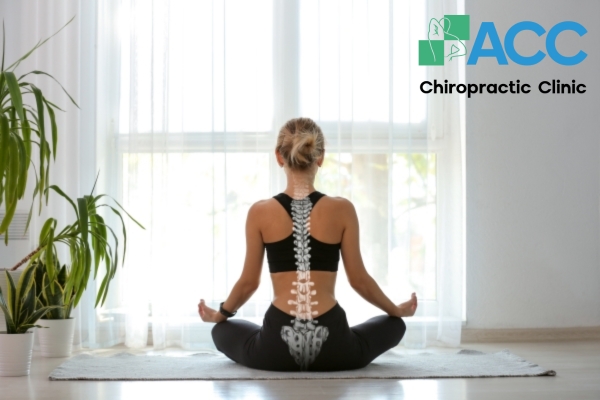
- Use Lumbar Support: If your chair lacks built-in support, place a small cushion or rolled towel behind your lower back. This maintains the natural inward curve (lordosis) and significantly reduces lumbar strain.
- Optimize Monitor Height: Never look down at your screen. Keep the top of your monitor at eye level so your neck remains neutral. Looking down (even at chest level) creates unnecessary leverage on the cervical spine.
- Walk with Confidence: When walking, keep your head up, chin parallel to the ground, and shoulders relaxed. Engage your core and swing your arms naturally in sync with your stride to maintain balance and momentum.
- Lift with Your Legs, Not Your Back: When picking up heavy objects, never bend from the waist. Instead, squat down by bending your knees, keep the object close to your body, and push up through your heels. This shifts the load to your powerful leg muscles rather than your fragile spinal discs.
- Choose Footwear Wisely: Limit the use of high heels, which tilt the pelvis forward and strain the lower back. Opt for supportive shoes with good arch support or consider using medical-grade orthotic insoles (like those custom-made at ACC) to balance your foundation.
Conclusion: Protect Your Body’s “Pillar”
Correct posture is not just about looking confident; it is the key to preventing permanent deformities like hunchback (Kyphosis) and chronic pain. By making small, conscious adjustments to how you sit, stand, and move, you are investing in a healthier future.
However, prevention also requires vigilance. Don’t wait for pain to appear. Regular musculoskeletal screenings-especially for the spine-are essential to detect silent misalignments early.
Take the next step for your health: Contact ACC today to schedule a comprehensive spinal check-up. Let our experts help you maintain a strong, flexible spine and a pain-free life.

ACC Chiropractic Clinic: The Pioneer of Chiropractic Care in Vietnam
ACC (Specializing in Chiropractic Treatment) proudly stands as a trusted destination for patients nationwide, offering musculoskeletal and spinal healthcare services that meet rigorous international standards.
A Legacy of Healing: With a history of over 16 years of operation, ACC has successfully helped thousands of patients-both domestic and international-overcome the fear of spinal degeneration, disc herniation, and chronic pain. We are dedicated to restoring health and hope to those suffering from dangerous musculoskeletal conditions.
Why We Are Different (The Optimal Regimen): Our high success rate is built on a specialized, non-surgical treatment protocol that addresses the root cause of pain:
- Chiropractic Adjustment: To realign the spine and relieve nerve pressure.
- Physical Therapy & Rehabilitation: To strengthen muscles and restore mobility.
- State-of-the-Art Technology: Utilizing modern equipment (such as DTS Traction, Lasers, and Shockwave therapy) to accelerate healing.
This comprehensive approach not only ensures safety and long-lasting effectiveness but also empowers patients to maintain a healthy spine and prevent future recurrence.
>> Read more: Lumbar disc herniation in young age